
Cart

What Are Winfort Commercial Smart Locks Used For?

Winfort commercial smart locks are designed for controlled access in workplaces, hospitality venues, rental properties, and shared facilities. They can replace traditional keys with PIN codes, mobile credentials, cards, or managed user permissions. This makes daily access easier to organize. It also creates a clearer record of entry activity.

In a busy office, an administrator might give a contractor access for one afternoon, then remove it automatically. Hotel staff can manage room access without carrying large key rings. In warehouses, authorized workers can enter storage areas while other doors remain restricted. Schools, clinics, and apartment buildings may also use these locks for offices, utility rooms, and shared entrances.

Their value depends on careful setup. A lock should match the door type, traffic level, network environment, and emergency access plan. Battery status needs regular attention. So does user management. A forgotten account can become a real weakness.

Security is layered.

Winfort commercial smart locks support access control, but they cannot replace sound policies, staff training, lighting, cameras, or dependable maintenance. Installation quality matters, too. An incorrectly aligned latch may reduce reliability during heavy use. Privacy deserves consideration when access records are stored or reviewed. Businesses should confirm data practices, system compatibility, and local safety requirements before purchasing.

The best results come from treating smart locks as part of a broader security process. They offer convenience and accountability, but no technology is perfect. A practical review should examine daily workflows, failure scenarios, accessibility needs, and long-term operating costs.
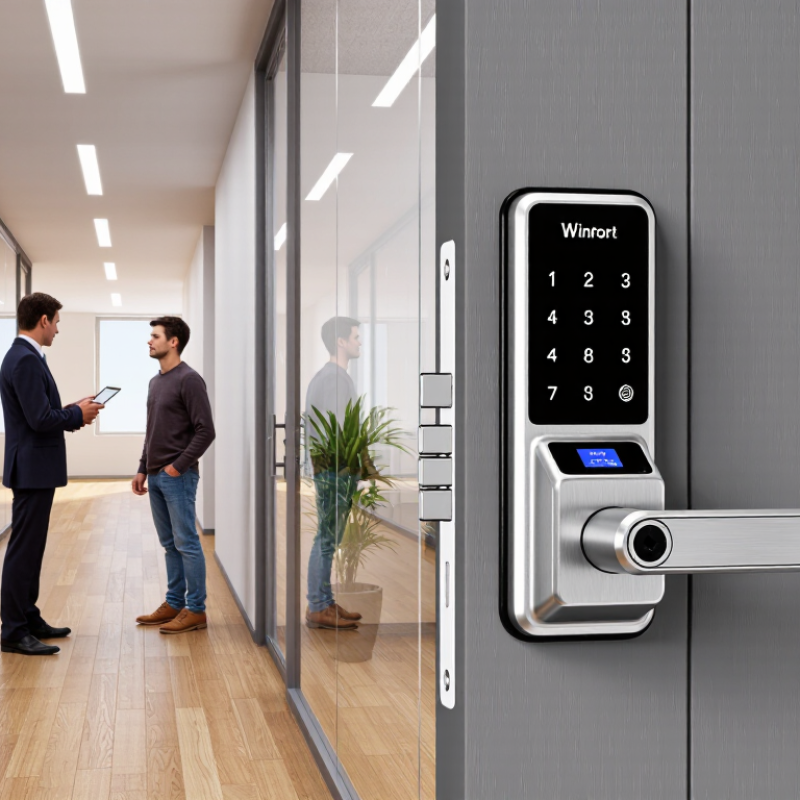
What Are Winfort Commercial Smart Locks Used For?

Market Context: Commercial Smart Locks at 19.6% CAGR, 2024–2030 (GVR)

What Are Commercial Smart Locks Used For?

Commercial smart locks support controlled entry in offices, hotels, schools, clinics, warehouses, and rental properties. They replace many metal keys with mobile credentials, PINs, cards, or biometric verification. Facility teams can assign access by person, door, time, and role. They can also review entry records when a dispute occurs. A cleaner audit trail matters during shift changes and contractor visits.

Grand View Research projects the commercial smart lock market to grow at a 19.6% CAGR from 2024 to 2030. Its analysis reflects rising demand for connected security and centralized property management. Other industry studies, including MarketsandMarkets coverage of smart access systems, highlight cloud platforms, wireless connectivity, and integration with building management tools. Growth sounds impressive. Yet adoption is not automatic. Older doors, weak networks, and poor credential management can reduce real value. A lock may be advanced, but the installation can still be careless.

Tips: Start with high-traffic doors, such as reception entrances or storage rooms. Check fire-exit requirements and backup access before deployment. Use separate permissions for employees, visitors, and maintenance staff. Review access logs regularly, not only after an incident. Test battery alerts and offline operation every month. Data collection also needs restraint; retaining every movement forever may create unnecessary operational and privacy concerns.

Office and Retail Access: Roles, Schedules, and Audit Trails

Commercial smart locks help offices and retail sites control who enters, when they enter, and which doors they can use. An office manager can assign staff roles, such as employee, cleaner, contractor, or visitor. Each role receives limited permissions. That matters.

Schedules make access more precise. Staff may enter during working hours, while contractors receive temporary access for a defined appointment. Retail managers can unlock stockrooms for selected employees but restrict sales-floor storage areas. Weekend and holiday schedules reduce manual changes, although exceptions still need careful review.

Audit trails record events such as successful entries, denied attempts, and administrative changes. These records can help managers investigate missing stock, confirm closing procedures, or check whether a former worker’s access was removed. Clear timestamps and door names make reports easier to understand. Keep it practical. Store records securely, limit administrator privileges, and follow appropriate privacy requirements.

A reliable setup also needs physical planning. Door condition, battery status, emergency procedures, and network stability can affect daily performance. The technology is not perfect. A schedule may be wrong, a user may be assigned twice, or a battery may fail at an inconvenient moment. Regular permission reviews and simple staff training can catch these weaknesses before they disrupt operations.

Hotels, Rentals, and Facilities: Temporary Credentials at Scale

What Are Commercial Smart Locks Used For?

Hotels, rental properties, and facilities often manage changing access needs every day. A room may turn over at 3 p.m. A contractor may need entry for two hours. A resident may move out before the next inspection. Commercial smart locks issue time-limited credentials for these moments, reducing key handoffs and unnecessary rekeying.

An industry forecast from STR and Tourism Economics estimated U.S. hotel occupancy at about 63.6% in 2024. That level of movement creates constant credential changes. Staff can assign a digital code before arrival and cancel it after departure. Maintenance teams can receive separate schedules. Managers can review access records when questions arise.

Rental operators face similar pressure. Harvard’s 2024 State of the Nation’s Housing report counted 22.4 million cost-burdened renter households in 2022, showing how closely housing operations must control costs. Smart access can support remote viewings, scheduled repairs, and move-in coordination without placing keys under mats. Small details matter. A code should expire automatically. Emergency access needs clear procedures. Batteries still require inspection.

The technology is not magic. Poor onboarding, weak account protection, or incorrect time zones can create avoidable failures. A cleaner process usually comes from combining temporary credentials with trained staff, documented permissions, and regular access reviews.

Temporary Credential Windows by Operational Use Case

Time-limited credentials help hotels, rental properties, and facilities provide access only for the period required. The ranges below represent common operational planning windows and should be adjusted to each property's policy.

Example planning ranges: hotel stays commonly span several nights, short-term rentals may extend up to 30 days, while contractor and event access is usually limited to the work period.

Security Rationale: 68% of Breaches Involve Human Error (Verizon DBIR 2024)

What Are Commercial Smart Locks Used For?

Commercial smart locks help offices, clinics, warehouses, schools, and managed properties control physical access. They replace scattered keys with digital credentials, PINs, mobile passes, or scheduled permissions. A facilities manager can grant a contractor access from 9:00 to 11:00 a.m., then remove it automatically. The system can also record who unlocked a door and when. That audit trail gives security teams useful evidence after an incident.

The human factor deserves closer attention. Verizon’s 2024 Data Breach Investigations Report found that 68% of breaches involved a non-malicious human element. A misplaced key, reused code, or careless access approval can create a quiet security gap. Smart locks reduce these routine mistakes by limiting permissions and showing access history. They do not remove responsibility. Someone must still configure users, review alerts, and protect administrative accounts.

Small details matter. A reception door may need public access during business hours, while a server room should remain restricted. Temporary credentials should expire automatically. Shared PINs should be avoided. Regular testing is essential, especially after staff changes. Yet smart locks can be misconfigured, and connectivity failures may disrupt normal entry. That uncomfortable limitation deserves honest planning. Strong security combines dependable hardware, clear procedures, trained staff, and regular review.

Deployment Choices: Cloud, Offline, Integrations, and Emergency Access

Commercial smart locks are used in offices, warehouses, clinics, rental properties, and shared facilities. Their deployment choice affects daily security and staff workload. Cloud management provides live door status, remote permission changes, scheduled access, and centralized audit records. It suits organizations with many locations. However, it depends on network availability and well-protected administrator accounts.

Offline deployment works better for doors with weak connectivity or strict local-control requirements. Permissions remain stored at the lock and synchronize later. This improves resilience, but access changes may not appear immediately. Integrations can connect locks with employee directories, visitor systems, time tracking, or building platforms through documented APIs. Test these connections carefully. A small data mismatch can create frustrating access failures.

Emergency access should combine speed with accountability. Options include time-limited emergency credentials, local backup methods, dual approval, and clearly documented override procedures. Every override should create an audit record. Tips: map each door’s risks before choosing cloud or offline control. Pilot a few doors first. Test power loss, network outages, low batteries, and emergency procedures. Keep recovery steps available to authorized staff. Perfect planning is rare. Review real usage logs, then adjust permissions and hardware settings.

What Are Winfort Commercial Smart Locks Used For? - Deployment Choices: Cloud, Offline, Integrations, and Emergency Access

Deployment Choice Typical Use Case Connectivity and Access Method Key Operational Benefits Important Considerations Emergency Access Options
Cloud-Managed Deployment Multi-site offices, hotels, student housing, healthcare facilities, and property portfolios requiring centralized administration. Wi-Fi Bluetooth Web dashboard
Administrators issue, change, or revoke credentials remotely.
Centralized user management, real-time activity records, remote configuration, scheduled permissions, and easier administration across multiple locations. Requires dependable network connectivity, suitable cybersecurity controls, account protection, and a defined data-retention policy. Mechanical override key, authorized mobile credential, temporary PIN, or a site emergency procedure. Backup power may be needed when electronic access depends on building power.
Offline or Standalone Deployment Small offices, storage rooms, utility areas, remote buildings, and locations with limited or unreliable internet access. Local keypad RFID credential Bluetooth
Access decisions are made locally at the lock or through periodic local administration.
Continues operating without an internet connection, reduces network dependency, and can be practical for isolated doors or smaller installations. Activity synchronization and remote revocation may be limited. Lost credentials require prompt local management, and battery condition must be monitored. Physical key override, master credential, emergency PIN, or an approved maintenance access procedure, subject to the facility’s security policy.
Hybrid Deployment Facilities that need centralized oversight for main entrances while keeping selected interior or remote doors locally controlled. Cloud gateway Local access Bluetooth
Connected and offline doors operate within the same access strategy where supported.
Balances centralized visibility with local resilience, allowing different doors to use the connectivity level appropriate to their risk and infrastructure. Requires clear door grouping, consistent credential rules, gateway planning, and testing of synchronization behavior during network outages. Local emergency credentials can remain available if the network is unavailable. Mechanical override and battery replacement procedures should also be documented.
Access-Control System Integration Commercial buildings that already use visitor management, video surveillance, identity systems, elevators, alarms, or centralized security software. API SDK Wiegand OSDP
The exact interface depends on the lock, controller, and existing access-control architecture.
Reduces duplicate administration, supports unified identity and access workflows, and can link door events with broader security operations. Compatibility must be verified before installation. Integration projects should address authentication, encryption, permissions, event mapping, and system availability. The integrated system may support emergency unlock or lockdown workflows. Independent mechanical override and documented fail-safe or fail-secure behavior remain important.
Mobile Credential Deployment Flexible workplaces, serviced apartments, hotels, campuses, and organizations that want to reduce the use of physical cards or keys. Bluetooth NFC Mobile app
A smartphone can serve as a digital credential when the lock and phone support the required technology.
Fast credential issuance, time-limited permissions, reduced card replacement, and convenient access for employees, residents, guests, or contractors. Users need compatible devices and adequate battery power. Mobile enrollment, phone loss, privacy, and credential revocation procedures should be defined. Temporary PIN, physical credential, authorized backup phone, mechanical key, or staffed reception process can provide an alternative when a phone is unavailable.
PIN and Keypad Access Shared offices, meeting rooms, equipment rooms, short-term rentals, and doors where issuing individual cards is inconvenient. PIN code One-time code
Codes may be permanent, scheduled, temporary, or assigned to specific users depending on the system.
Enables keyless entry, supports temporary access, and avoids the need for users to carry a physical credential. Codes must not be shared casually. Administrators should use unique or time-limited codes where possible and protect the keypad from observation and tampering. Backup PIN, authorized physical key, emergency credential, or manual security assistance. Emergency codes should be controlled and audited.
Guest, Contractor, and Temporary Access Building maintenance, cleaning services, deliveries, short-term guests, move-in periods, and scheduled service visits. Time-limited PIN Digital key Visitor credential
Permissions can be restricted by door, date, time, or user role.
Improves accountability, limits access to the required period, and reduces the need to hand over permanent keys or cards. Access windows, identity verification, cancellation, and event-log review should be included in the operating procedure. A supervised entry process, temporary emergency credential, reception-managed access, or mechanical override may be used if the scheduled credential fails.
Emergency and Business-Continuity Mode Fire, evacuation, power failure, network outage, cybersecurity incident, or urgent operational response. Mechanical override Backup battery Emergency credential
The correct response depends on the door’s fail-safe or fail-secure design and local safety requirements.
Preserves a controlled path for authorized entry while supporting continuity during infrastructure or system failures. Emergency behavior must be coordinated with fire-safety rules, evacuation plans, local regulations, and the facility’s risk assessment. Regular drills and testing are essential. Use only approved emergency procedures, such as a fire-alarm release interface, mechanical key, backup power, emergency PIN, or authorized security response.

Skip to content